Wechart friends analysis
Recently, I’ve learnt how to analyse friends’ data of my wechart, thanks to yangxuanxc. Pyecharts has been proven to be a great tool of data visualization. I feel an urgent need to learn it. Meanwhile, some app-related python packages are of innumorous possibilities as well, such as itchat, NetEaseMusicApi.
Environment
win7
python3.6
Requirement
Need to install following packages:
itchat
json
requests
codec
pyecharts
collections
jieba
PIL(Pillow)
os
math
echarts-china-cities-pypkg    0.0.8
echarts-china-provinces-pypkg 0.0.2
echarts-countries-pypkg
Start
Use itchat to login wechat and import data of friends.
# coding=utf-8
import itchat
import json
import requests
import codecs

sex_dict = {}
sex_dict['0'] = "others"
sex_dict['1'] = "male"
sex_dict['2'] = "female"

def download_images(frined_list):
    image_dir = "./images/"
    num = 1
    for friend in frined_list:
        image_name = str(num)+'.jpg'
        num+=1
        img = itchat.get_head_img(userName=friend["UserName"])
        with open(image_dir+image_name, 'wb') as file:
            file.write(img)

def save_data(frined_list):
    out_file_name = "./data/friends.json"
    with codecs.open(out_file_name, 'w', encoding='utf-8') as json_file:
        json_file.write(json.dumps(frined_list,ensure_ascii=False))

if __name__ == '__main__':
    itchat.auto_login()

    friends = itchat.get_friends(update=True)[0:]
    friends_list = []

    for friend in friends:
        item = {}
        item['NickName'] = friend['NickName']
        item['HeadImgUrl'] = friend['HeadImgUrl']
        item['Sex'] = sex_dict[str(friend['Sex'])]
        item['Province'] = friend['Province']
        item['Signature'] = friend['Signature']
        item['UserName'] = friend['UserName']
        friends_list.append(item)

    save_data(friends_list)
    download_images(friends_list)
    itchat.run()
After importing data of friends from wachat, we can analyse them and visualize them in chars, bars or map.
#coding=utf-8

import json
from pyecharts import Bar
from pyecharts import Grid
from pyecharts import WordCloud
from pyecharts import Pie
from pyecharts import Map
from collections import Counter
import jieba.analyse
import PIL.Image as Image
import os
import math
import codecs


def get_pie(item_name,item_name_list,item_num_list):
    totle = item_num_list[0]+item_num_list[1]+item_num_list[2]
    subtitle = "Gender of %d friends"%totle

    pie = Pie(item_name,page_title = item_name,title_text_size=30,title_pos='center',\
        subtitle = subtitle,subtitle_text_size = 25,width=800,height= 800)

    pie.add("", item_name_list, item_num_list,is_label_show=True,center=[50, 45],radius=[0,50],\
        legend_pos ='left',legend_orient='vertical',label_text_size=20)

    out_file_name = './analyse/'+item_name+'.html'
    pie.render(out_file_name)

def get_bar(item_name,item_name_list,item_num_list):
    subtitle = "Geogaphical distribution"
    bar = Bar(item_name,page_title = item_name,title_text_size=30,title_pos='center',\
        subtitle = subtitle,subtitle_text_size = 25)

    bar.add("", item_name_list, item_num_list,title_pos='center', xaxis_interval=0,xaxis_rotate=27,\
        xaxis_label_textsize = 20,yaxis_label_textsize = 20,yaxis_name_pos='end',yaxis_pos = "%50")
    bar.show_config()

    grid = Grid(width=1300,height= 800)
    grid.add(bar,grid_top = "13%",grid_bottom = "23%",grid_left = "15%",grid_right = "15%")
    out_file_name = './analyse/'+item_name+'.html'
    grid.render(out_file_name)


def get_map(item_name,item_name_list,item_num_list):
    subtitle = "Geogaphical distribution map"
    _map = Map(item_name,width=1300,height= 800,title_pos='center',title_text_size=30,\
        subtitle = subtitle,subtitle_text_size = 25)
    _map.add("", item_name_list, item_num_list, maptype='china', is_visualmap=True, visual_text_color='#000')

    out_file_name = './analyse/'+item_name+'.html'
    _map.render(out_file_name)


def word_cloud(item_name,item_name_list,item_num_list,word_size_range):

    wordcloud = WordCloud(width=1400,height= 900)

    wordcloud.add("", item_name_list, item_num_list,word_size_range=word_size_range,shape='pentagon')
    out_file_name = './analyse/'+item_name+'.html'
    wordcloud.render(out_file_name)

def get_item_list(first_item_name,dict_list):
    item_name_list = []
    item_num_list = []
    i = 0
    for item in dict_list:

        i+=1
        if i >=15:
            break

        for name,num in item.items():
            if name != first_item_name:
                item_name_list.append(name)
                item_num_list.append(num)

    return item_name_list,item_num_list

def dict2list(_dict):
    name_list = []
    num_list = []

    for key,value in _dict.items():
        name_list.append(key)
        num_list.append(value)

    return name_list,num_list

def counter2list(_counter):
    name_list = []
    num_list = []

    for item in _counter:
        name_list.append(item[0])
        num_list.append(item[1])

    return name_list,num_list

def get_tag(text,cnt):
    tag_list = jieba.analyse.extract_tags(text)
    for tag in tag_list:
        cnt[tag] += 1

def mergeImage():
    print("Combining avatars")
    # Set images' size
    photo_width = 200
    photo_height = 200
    # Create photo_path_list
    photo_path_list = []
    # Work dictionary
    dirName = os.getcwd()+'/images'
    # Add all pic to photo_path_list
    for root, dirs, files in os.walk(dirName):
            for file in files:
                if "jpg" in file:
                        photo_path_list.append(os.path.join(root, file))
    pic_num = len(photo_path_list)
    # Culculate the length of final square and max pic num
    line_max = int(math.sqrt(pic_num))
    row_max = int(math.sqrt(pic_num))

    if line_max > 20:
        line_max = 20
        row_max = 20

    num = 0
    pic_max=line_max*row_max
    # Combine all pic
    toImage = Image.new('RGBA',(photo_width*line_max,photo_height*row_max))

    for i in range(0,row_max):
        for j in range(0,line_max):
            pic_fole_head =  Image.open(photo_path_list[num])
            width,height =  pic_fole_head.size
            tmppic = pic_fole_head.resize((photo_width,photo_height))
            loc = (int(j%row_max*photo_width),int(i%row_max*photo_height))
            toImage.paste(tmppic,loc)
            num= num+1

            if num >= len(photo_path_list):
                    break

        if num >= pic_max:
            break


    print(toImage.size)
    toImage.save('./analyse/merged.png')


if __name__ == '__main__':
    # Read from friends.json
    in_file_name = './data/friends.json'
    with codecs.open(in_file_name, encoding='utf-8') as f:
        friends = json.load(f)
    # Data indexes
    sex_counter =  Counter()
    Province_counter = Counter()
    NickName_list = []
    Signature_counter = Counter()
    for friend in friends:
        sex_counter[friend['Sex']]+=1
        if friend['Province'] != "":
            Province_counter[friend['Province']]+=1
        NickName_list.append(friend['NickName'])
        get_tag(friend['Signature'],Signature_counter)

    # Sex
    name_list,num_list = dict2list(sex_counter)
    get_pie('Gender statistic',name_list,num_list)
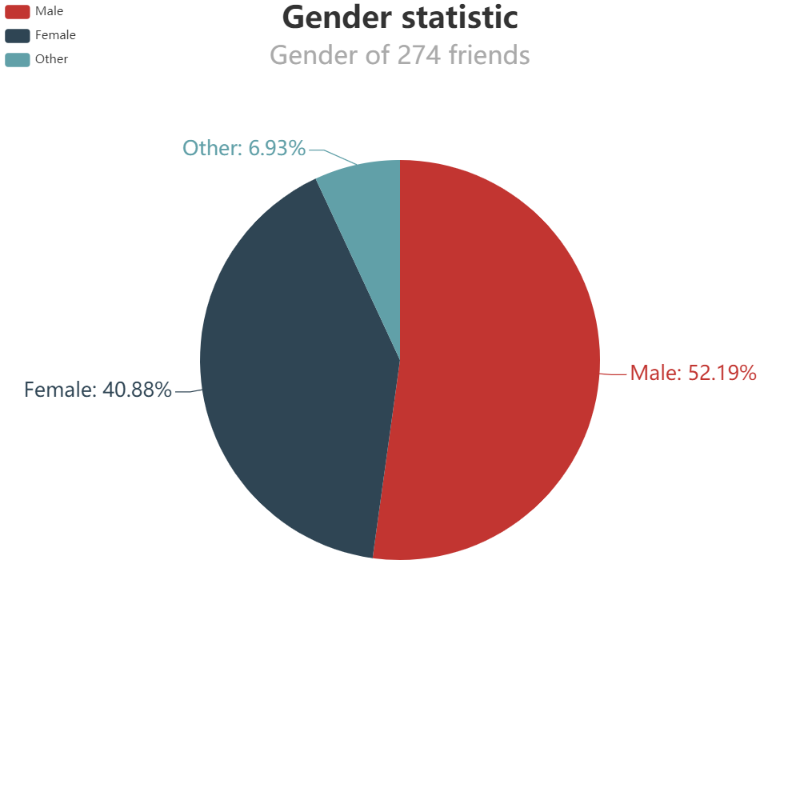
Er, the gender ratio seems not fair enough in my friends list.
# Top 15 provinces
name_list,num_list = counter2list(Province_counter.most_common(15))
get_bar('Geogaphical distribution',name_list,num_list)
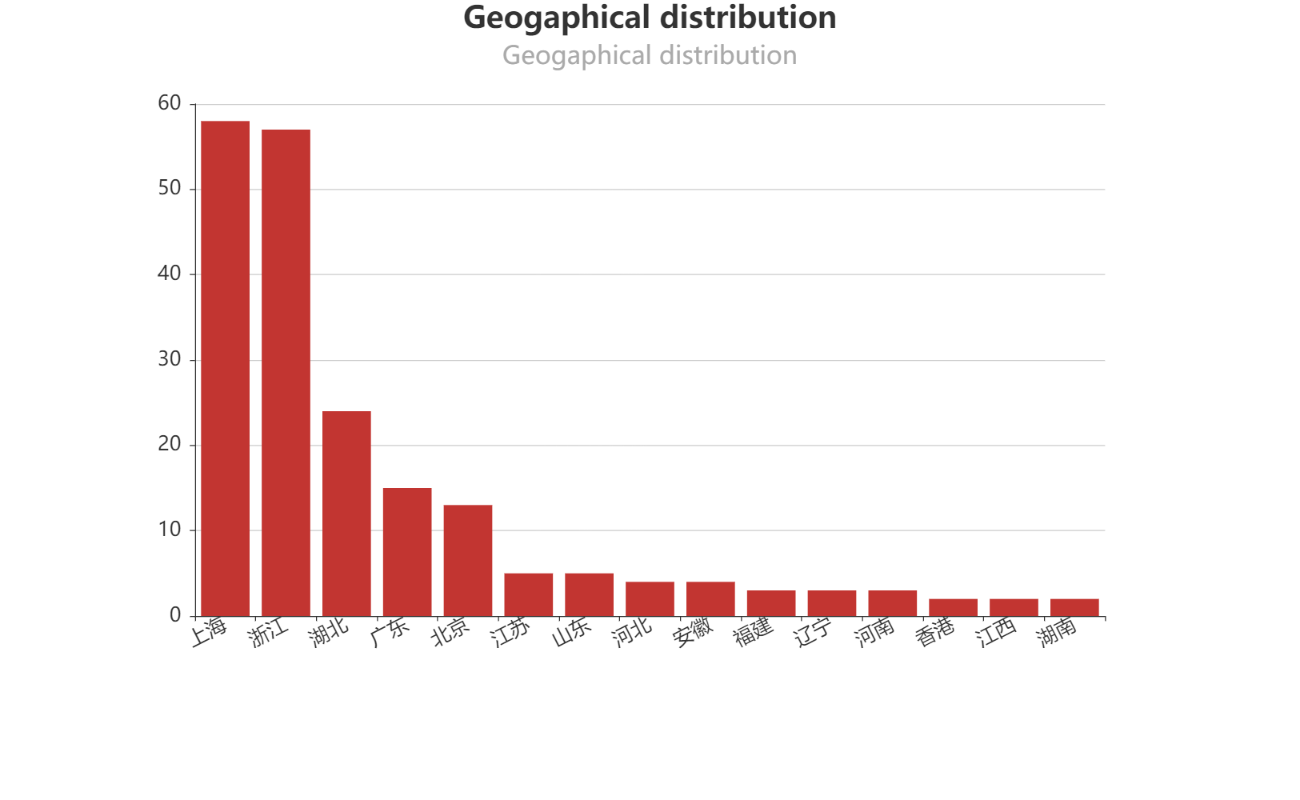
Apparently, my friends concentrate in Shanghai, Zhejiang, Hubei and Guangdong.
# Mapping
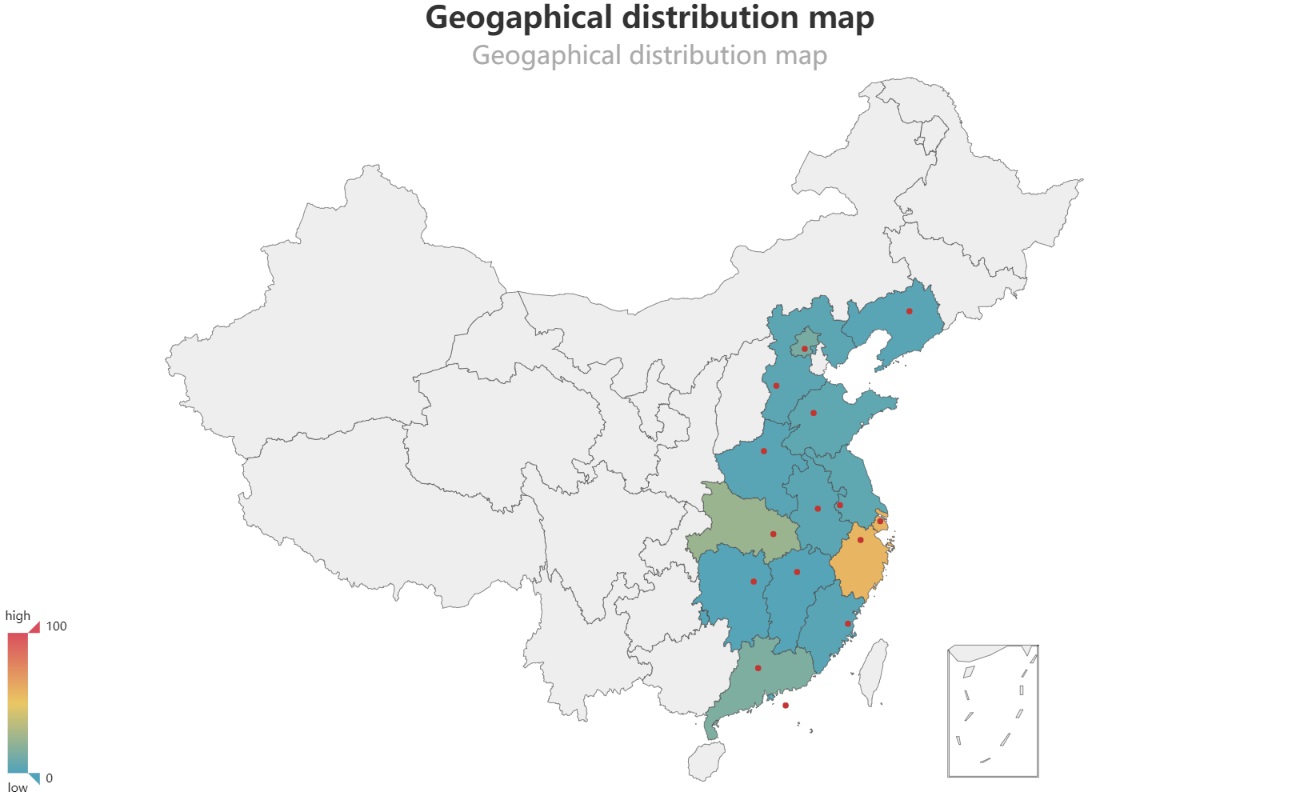
get_map('Geogaphical distribution map',name_list,num_list)
# Nicknames
num_list = [5 for i in range(1,len(NickName_list)+1)]
word_cloud('Nicknames of wachat friends',NickName_list,num_list,[18,18])
Sorry, this result is not presented to protect my friends’ privacy.
# Signture
name_list,num_list = counter2list(Signature_counter.most_common(200))
word_cloud('Signature word cloud',name_list,num_list,[20,100])
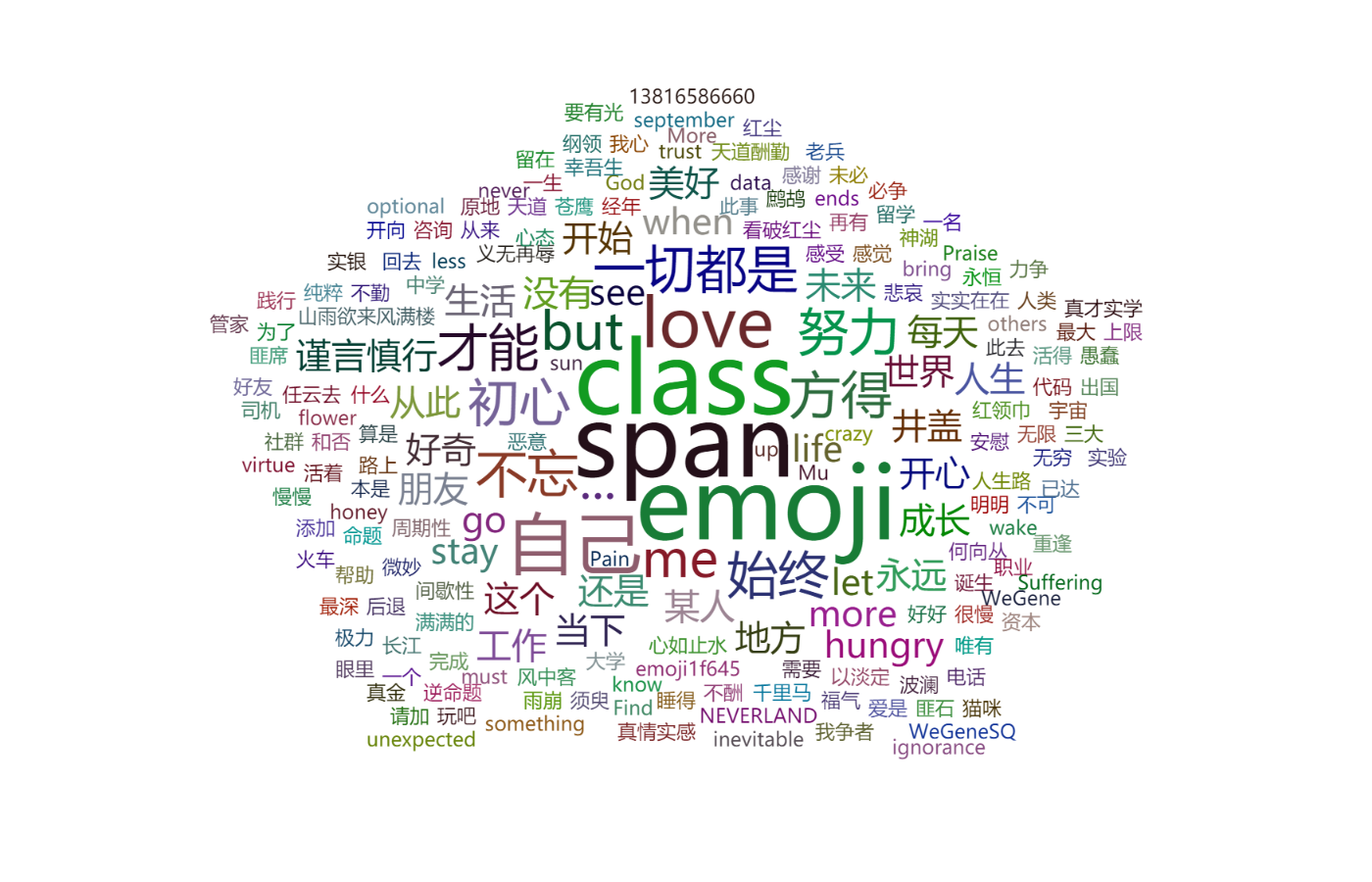 These are some key words in our signatures.
# Avatars
mergeImage()
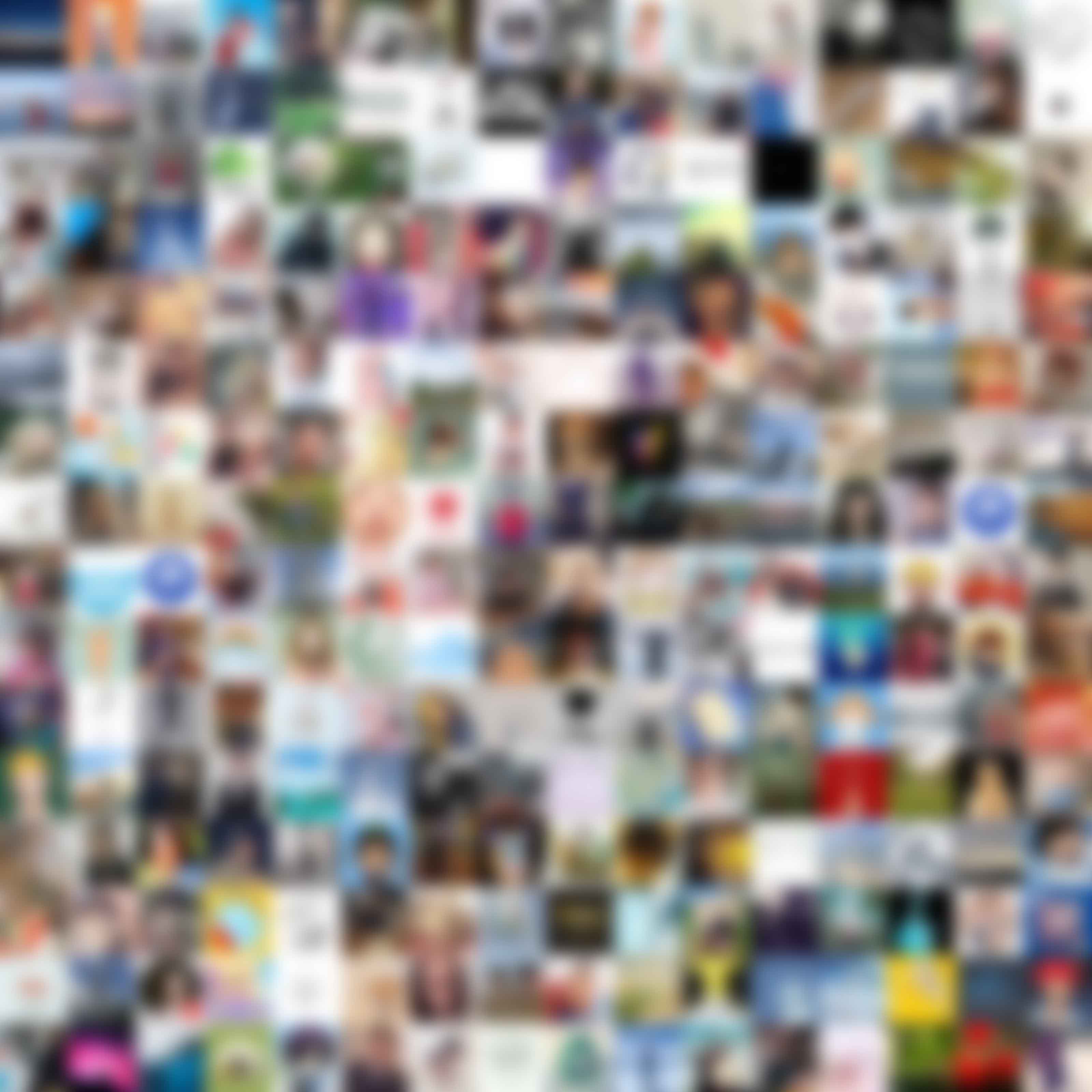 Eh, a Gaussian Blur is applied to cover for the privacy.
Is it fanticy? Try it yourselves immdiately!